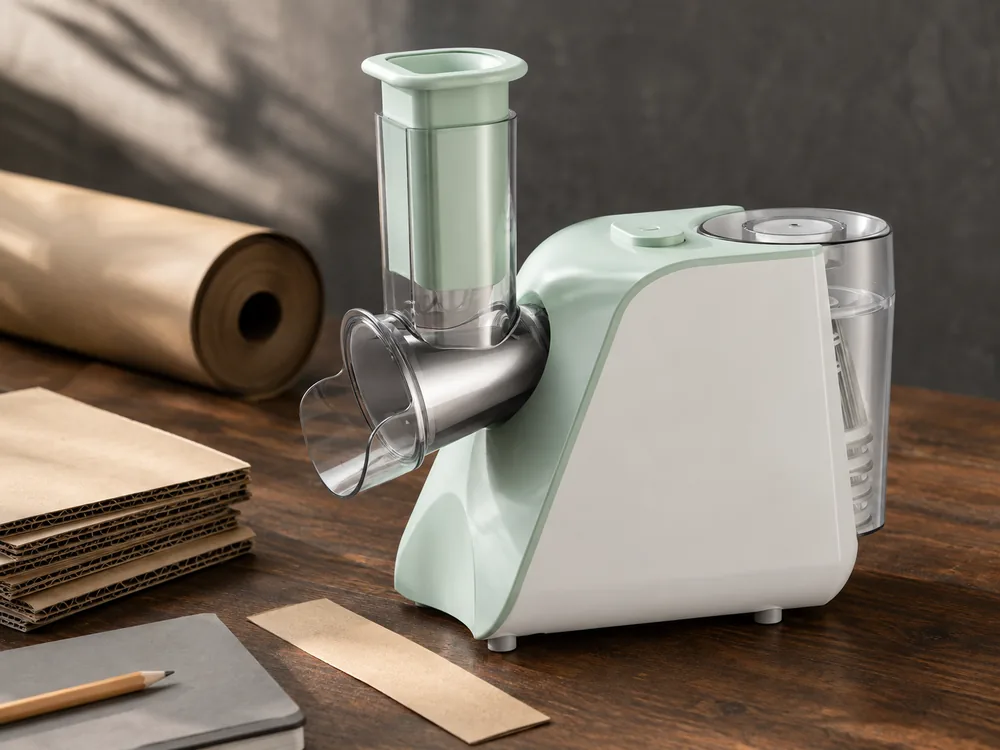
Salad maker packaging needs to answer two questions quickly: what does this machine do, and what does the customer receive? A photograph of the base alone may not explain the feed path. A photograph surrounded by every available drum may promise more accessories than the order includes.
For salad maker packaging, begin with the selected machine and cutting set. Use the main view to explain the feed path and the contents panel to identify what is supplied. Settle those two jobs before investing in final artwork.
Start salad maker packaging with the confirmed cutting set
JINJIE's SLJ-01, with secondary reference SM1101, is listed with a knife box and five tools covering thick slicing, thin slicing, thick shredding, thin shredding and grinding. Those names describe a particular configuration. They should not become a standard list applied to every salad maker image.
Use the approved set list to select the product photographs. If the asset library shows more tools, another housing or a different storage arrangement, ask whether the image belongs to the ordered version. A folder name grouping several models does not prove every item in the folder is part of one retail set.
Write a plain-language included-items line and compare it with the image. Every pictured accessory should either be included or unmistakably identified as illustrative. Keep decorative food and receiving containers separate from the pack-out count.
The function count should follow the confirmed tools. Do not add a dicing icon because a different model in the quotation mentions dicing. The package must describe the selected product.
Give the artwork team one selected configuration rather than a folder of possible products. Include the approved image reference and the named tools. Alternatives can remain in the project archive, but they should not sit beside the final assets without a clear status.
Identify what the first image is meant to communicate. A main product view can establish the appliance format, while a separate contents view can explain the cutting set. Trying to show every use, every accessory and every branding idea in one composition can make the actual offer harder to understand.
Unprinted boxes or paper props can help illustrate a packaging discussion, but they are not approved artwork or evidence of a finished retail pack. Keep that distinction in the project record and use the final production files when approving what will be printed.
Show the feed path and the supplied cutting tools
A useful product view shows the feed chute, pusher position and outlet clearly. It lets a customer understand the format before reading the details. For a feed-through appliance, the relationship between the outlet and receiving container matters more than a decorative kitchen background.
Use a real supplied image or a photograph of the approved sample. Do not alter the product geometry to make a larger bowl fit, remove a guard for visual clarity or add an accessory that the model does not have.
If prepared food appears in the image, the depicted result needs support for that model and cutting tool. Food styling is not a substitute for a result review. A photograph also cannot establish a cutting thickness, processing rate or “no waste” claim.
For dimensional decisions, ask for measurements of the actual setup. The base dimensions do not describe all the space required to insert ingredients or remove a receiving bowl. Those clearances belong in the technical review before a lifestyle image promises a particular arrangement.
Review the image at the size it will appear on the package. A pusher or outlet that is clear in a full-resolution photograph may become hard to recognize when reduced. If the image no longer explains the product, change the crop or composition without changing the product itself.
Keep the working arrangement plausible and within the instructions. The receiving container should not obscure the outlet, and the product should not be shown with removed protective parts merely to expose a cutting tool. A clearer accessory detail can explain the tool without depicting an unsafe operating setup.
For a family of color variants, check whether the product photograph and contents view still describe the same set. A correct color image paired with the wrong accessory panel can be more confusing than a simple missing photograph because it appears complete at first glance.
Use a product-only view where a lifestyle scene introduces ambiguity. A decorative bowl can be useful for explaining discharge, but it should not make the customer assume a vessel is included. The best composition is the one that communicates the actual offer clearly, not necessarily the one with the most props.
Give customers a way to identify the tools
Use the same tool names in the included-items list, instructions and any accessory legend. If the supplier uses a term that is unclear in the retail market, agree on the translation before layout. Keep the approved source term in the internal record so the packing team can still identify the part.
An accessory photograph can help when the shapes look similar. Pair the picture with the relevant name. Do not assign a cutting result solely from the color or number of holes visible in a low-resolution image.
Where a storage box is supplied, check how the tools are placed and removed according to the product's instructions. Where it is not supplied, avoid showing one as a standard feature. An attractive storage solution in the asset library may belong to another version.
The same care applies to safety and cleaning symbols. Use the approved model instructions for pusher use, assembly, cleaning and handling of cutting parts. A general icon set downloaded for another appliance cannot establish those permissions.
Check the names across languages against the same physical tool. A translator may choose a familiar cooking term that suggests a different result from the supplier's source term. Resolve the meaning with the responsible product contact before making the translated word part of a prominent feature claim.
Keep the tool illustration close enough to the name that the customer can connect them. Where two tools look similar, use a clear detail or an identified reference image. Do not rely on a color code unless that code is actually present and consistent in the supplied set.
Treat result photographs as a separate evidence question. A tool can be correctly identified while its illustrated food result remains unsupported. The product review should confirm the permitted ingredient and intended output before the artwork uses that result to sell the set.
Resolve artwork conflicts before the printing decision
A packaging review is easier when conflicts are described specifically. “The box is wrong” gives the designer little direction. Identify the panel, the claim or image that conflicts with the selected configuration, and the reference that should replace it.
Use the following comparison to decide what needs correction. The cases are hypothetical review situations, not a record of defects in JINJIE packaging.
|
Conflict found |
Why it matters to the customer |
Correction to resolve |
|---|---|---|
|
Main image shows more tools than the contents list |
The apparent supplied set is larger than the order |
Replace the image or correct the selected offer before approval |
|
Tool name differs between box and instructions |
The customer cannot identify the intended accessory reliably |
Agree one meaning and update the affected files |
|
A receiving bowl appears to be included but is only a prop |
The box may promise an item that is absent |
Clarify the presentation and actual contents |
|
Dicing is shown for a set without confirmed dicing parts |
The package promises an unsupported result |
Remove the claim or select a confirmed configuration |
|
A previous color variant's SKU remains on the proof |
The printed identity does not match the selected product |
Correct the variant reference and review the affected panels |
Prioritize conflicts that change what the customer thinks is being purchased. An incorrect accessory count or unsupported result is not a minor styling issue. Resolve it before spending time on decorative adjustments that cannot repair the underlying promise.
Where the buyer changes the product instead of the artwork, return to the set and packing review. Adding a tool to make an attractive image accurate changes the physical offer and may affect cost, instructions and protection. That decision should be explicit rather than treated as an easy graphic correction.
Keep a short record of the resolution. Identify the revised file and the item it corrects, then make sure the old proof is not still marked as current. The purpose is to let the next reviewer confirm the change without repeating the entire design discussion.
Review an actual packed sample
An artwork proof can verify wording and placement. It cannot show whether the product, pusher and cutting tools are correctly separated or protected inside the box. Review the actual arrangement or an identified packaging sample before approving the final pack-out.
|
Checkpoint |
Evidence to request |
|---|---|
|
Correct appliance |
Model and electrical version matched to the order |
|
Complete accessory set |
Item-by-item count against the approved list |
|
Component protection |
Packing arrangement for the actual parts |
|
Instructions and labels |
Correct version, language and part illustrations |
|
Retail claims |
Each function and included item matched to the configuration |
|
Master carton |
Agreed packing quantity and measured carton reference |
Where transport testing is required, agree on the scope with the responsible packaging or test team. The route, package and buyer requirement should define the evaluation. A standard-looking insert or a heavier carton is not evidence of a successful test.
If a packed sample shows damage or a missing tool, request a revised arrangement and review it again. Compare the resulting box size and packed weight before accepting the correction, since added protection can affect carton quantity and freight as well as presentation.
Review completeness and protection as separate questions. A box can contain every required item while allowing an assembly to move in an unsuitable way. Another can protect the machine but omit a small component. Record the actual finding so the supplier can address the right problem.
Check the unpacking sequence against the instructions. The customer should be able to identify the supplied tools and any storage item without guessing whether a protected part is disposable packing. The packaging team should determine the appropriate protective arrangement for the actual cutting components.
Ask for the final measured package information after the arrangement is settled. Early estimates can help planning, but they should not become the final carton specification by default. If protection changes, confirm whether the packed dimensions, quantity or weight also changes.
JINJIE's quality and testing page provides a starting point for discussing the agreed packing checks. Tie the request to the selected salad maker and tool set. General packing photographs from another product cannot establish the insert or transport performance of this package.
If a review is remote, request views that answer the open question. A closed carton photograph can show exterior marks but not the arrangement inside. An open box can show contents but not necessarily the final closure. Ask for the relevant evidence without treating one attractive overview as a complete packaging approval.
Control the handover to production and retail content
Give the artwork, included-items list and pack-out reference clear revision identifiers. The supplier should be able to see which version is approved and which has been replaced.
Then compare the retail content with that same file. Product listings, instruction illustrations and the box should not show three different accessory combinations. This check is particularly useful when a brand has several color or tool-set variants.
For a color-only variant, check whether the existing layout can be retained with the correct image, SKU and agreed color reference. A changed tool set needs its own contents panel and pack-out. Obtain the cost of those changes before treating an additional variant as a low-cost extension.
List the files that must move together when a change is accepted. A revised accessory panel on the box may also require a product-page image and an instruction illustration to change. Updating only the printing file leaves the customer-facing offer inconsistent after the cartons arrive.
Separate design approval from permission to print. A team may approve the visual direction while a product detail is still unresolved. Record that limitation clearly and agree the release point with the supplier. A positive comment about the layout should not be interpreted as permission to manufacture every printed component.
For a repeat order, check that the retained artwork still belongs to the current set. If a tool, color reference or supplied storage item has changed, compare the old files against the revised physical offer. Reusing artwork is efficient only when it still describes what will be packed.
Ask which version will be used for the order and retain a copy of that exact proof. A file name containing “final” is not enough when several final versions exist. The current reference should be identifiable by its revision and the selected SKU.
Inspect the proof at its intended physical size when text and accessory details are small. A layout that looks clear when enlarged on a monitor may become difficult to read on the printed panel. Ask for an appropriate proof or sample to review those details before authorizing the print run.
Check identification fields against the buyer's own approved records. If a SKU, barcode or variant name is supplied by the buyer, the designer should reproduce the correct value rather than borrow it from an older box. Confirm any required readability or scanning checks through the appropriate project process; visual resemblance alone does not establish that an identifier works.
Assign the final sign-off to a person who can see both the artwork and the selected product information. A designer may correctly implement a requested change without knowing that the purchasing team changed the tool set afterward. Bringing those references together once at the release point is more useful than several disconnected approvals of individual panels.
If a late change is necessary, identify the affected files and ask what has already been prepared. Decide the correction with that scope visible instead of assuming that replacing a digital proof also replaces material already printed.
JINJIE's electric salad maker category explains the relationship between feed structure, cutting tools and retail pack-out. Its OEM and ODM page outlines the packaging review around a selected product. Use both to define the files that must agree.

Conclusion
Send JINJIE the chosen machine, cutting-set list and retail artwork brief. Request a matched pack-out reference before signing off the box. The approval should identify the package the customer will actually open.
Use the product image to explain the format, the contents information to define the offer and the packed sample to review the physical arrangement. When those three agree, the artwork has a clear basis for the final printing decision.
FAQ
Can a receiving bowl be shown if it is not included?
It can explain the product's use, but the presentation must not imply that the bowl comes in the box. Keep the included-items list and any illustration note clear.
Is a five-function badge sufficient to describe the accessories?
No. Name the supplied tools and confirm what the count refers to. The buyer and packing team need an actual item list.
When should the final carton size be confirmed?
After the selected product, protection and accessory arrangement are defined and the relevant package is measured. Do not scale carton dimensions from a product rendering.
Can the same box design be reused for a smaller tool set?
The layout may be reusable, but every image, count and contents statement needs to match the smaller set. Review the internal arrangement as well. A shared design does not justify showing accessories that are absent from that SKU or retaining protection intended for a different combination.